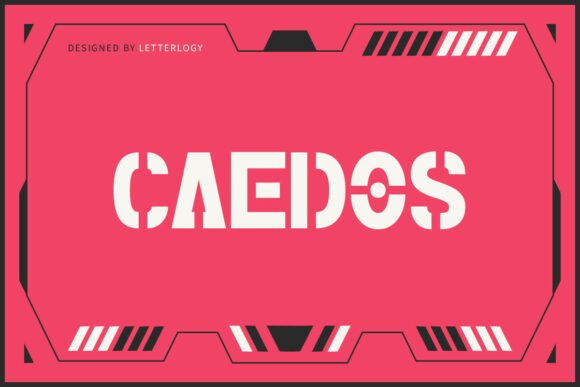
Caedos: A Futuristic Stencil Font for High-Tech Design Projects
Caedos is more than just a typeface—it's a design tool engineered for precision, clarity, and visual impact. As a futuristic stencil font, it blends the clean lines of modern sans serif design with the industrial edge of modular geometry. This makes Caedos ideal for projects that demand a strong, high-tech identity. Whether you're designing for a sci-fi interface, a cinematic title sequence, or a branding package for a tech startup, Caedos offers a bold presence that commands attention while maintaining readability and structural integrity.
Understanding the Role of Caedos in Design Workflows
Incorporating Caedos into your design workflow starts with understanding where it fits within the broader creative process. Unlike traditional fonts used for body text or general branding, Caedos excels as a display typeface. It’s best suited for titles, headers, and visual statements rather than long-form content. This distinction is important when planning your design hierarchy and visual communication strategy.
Before diving into a project, consider the context in which the font will be used. Is it for a video game interface that needs a cyberpunk edge? A military-themed poster requiring a strong, authoritative presence? Or perhaps a UI component in a futuristic dashboard design? Mapping out these use cases early ensures that Caedos enhances the visual narrative rather than competes with it.
Integrating Caedos into Your Design Toolkit
Caedos works best when paired with complementary tools and design assets. For example, in a UI/UX project, using Caedos for on-screen labels or menu headers can create a consistent, high-tech aesthetic. Pair it with minimalist icons, geometric shapes, and a limited color palette to maintain visual harmony. In print or motion design, combining Caedos with vector graphics or 3D renderings can elevate the futuristic theme.
Its all-uppercase format and stencil structure mean it pairs well with both digital and physical design environments. Whether you're working in Adobe Illustrator, Figma, Blender, or even laser-cutting designs for physical prototypes, Caedos maintains its clarity and impact across mediums. This cross-platform usability makes it a versatile asset in both personal and professional workflows.
Using Caedos Throughout the Creative Process
Design projects often evolve through phases—planning, execution, and refinement. Caedos can play a role in each stage. During the planning phase, experimenting with the font in mockups or mood boards can help establish the visual tone of the project. In the execution phase, it becomes a functional design element, helping define key messages and visual hierarchy. During refinement, you may adjust spacing, contrast, or layering effects to ensure Caedos integrates smoothly with other design components.
For instance, in a branding project for a robotics startup, you might use Caedos during the ideation phase to test how its industrial feel aligns with the brand’s personality. Once the direction is set, it can be applied to logos, product labels, or website headers. In post-production, you may fine-tune its usage by adjusting kerning or color contrast to ensure legibility across devices and print materials.
Compatibility and Usability Considerations
When integrating Caedos into your design system, it’s important to test for compatibility across platforms and file formats. Most modern design tools support custom fonts, but rendering can vary, especially in web or mobile environments. If you're using Caedos in a web-based project, ensure it’s properly embedded using web-safe formats like WOFF or OTF. For print, always check that the font is embedded or outlined before exporting final files.
Usability also plays a role in how the font is perceived. Because of its stencil structure, Caedos may not be suitable for small text sizes or low-resolution displays. Use it where it can shine—on large headers, posters, or interactive elements where visual impact is key. In digital interfaces, consider pairing it with a simpler sans serif for subheadings or body text to maintain readability while preserving the futuristic aesthetic.
Workflow Tips for Efficient Implementation
To streamline your workflow when using Caedos, follow these practical implementation tips:
- Create reusable templates: Save time by building templates in your preferred design tool that include Caedos as a default header or title font. This is especially useful for branding kits, UI kits, or presentation decks.
- Use consistent styling: Define a set of text styles (size, spacing, color) that work well with Caedos and apply them consistently across your project to maintain visual cohesion.
- Test across devices: If your design will be viewed on multiple screens or printed, test Caedos at different sizes and resolutions to ensure it maintains its legibility and impact.
- Layer for depth: Take advantage of the stencil design by layering with background textures or gradient overlays to create depth without compromising clarity.
Long-Term Use and Scalability
As your design needs grow, so should your font strategy. Caedos is scalable in both literal and conceptual terms. Literally, it can be resized for different applications without losing its structural integrity. Conceptually, it can be part of a broader visual language that evolves with your brand or project. If you start with Caedos for a game title, for example, you can later extend its use to promotional materials, merchandise, or in-game UI elements.
For businesses or creators managing multiple projects, maintaining a centralized font library with usage guidelines ensures consistency. This is especially important when working with teams or handing off files to external collaborators. Document how and where Caedos should be used, and include examples of appropriate pairings and formatting rules.
Real-World Applications and Outcomes
Caedos has found a home in a variety of creative and technical fields. In video game design, developers use it for mission titles, HUD elements, and loading screens to create an immersive, high-tech environment. In marketing, it's used for event posters, tech product launches, and digital campaigns targeting audiences interested in innovation and futurism.
Educators and content creators also benefit from its clarity and visual punch. Whether designing a YouTube thumbnail, a presentation slide, or a digital course banner, Caedos helps communicate a sense of authority and modernity. Its bold presence ensures that key messages are seen and remembered, which is crucial in fast-paced digital environments.
Final Thoughts on Integrating Caedos Into Your Workflow
Incorporating Caedos into your design process isn’t just about aesthetics—it’s about enhancing communication through intentional typography. By understanding its strengths, planning for compatibility, and applying it strategically within your workflow, you can leverage this futuristic stencil font to elevate your visual storytelling. Whether you're a solo creator or part of a larger team, Caedos offers a modular, adaptable solution that aligns with both current and future design needs.