Rainbow Squash: A Practical Font for Creative and Commercial Projects
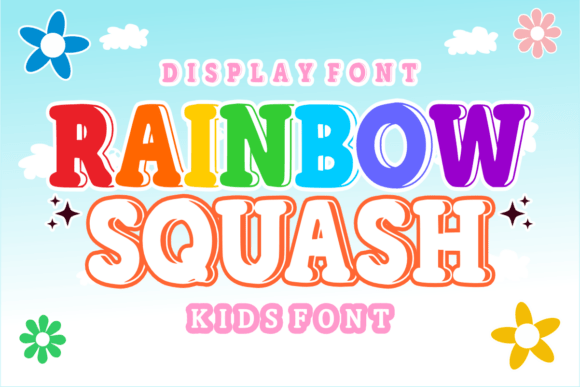
When working on creative or commercial projects that target children or require a playful, engaging visual tone, choosing the right font can make a significant difference. Rainbow Squash is a modern, uppercase-only children’s font designed with vibrancy and clarity in mind. It’s especially useful for creators, educators, and small business owners who need to produce materials that appeal to younger audiences while maintaining a professional finish.
Understanding Rainbow Squash in the Design Workflow
Rainbow Squash fits naturally into the design process at various stages, whether you're brainstorming ideas, finalizing layouts, or preparing files for print or digital use. Its cheerful aesthetic makes it ideal for early-stage visual mockups where tone and engagement are critical. Because it’s an all-caps font, it works best for short bursts of text—such as titles, headings, or labels—rather than extended body copy.
Designers and marketers can integrate Rainbow Squash early in the concept phase to gauge how a playful tone aligns with brand identity or campaign messaging. Educators and content creators can use it during the development of learning materials to capture attention and make lessons more visually appealing.
Use Cases and Practical Applications
Rainbow Squash shines in a variety of applications, particularly those aimed at children or those that benefit from a whimsical touch. Here are some common use cases where this font adds value:
- Logos: Especially for brands targeting children or those with a fun, creative identity.
- Coloring Books: Enhances visual appeal and readability for young users.
- Children’s Comics: Works well for speech bubbles and titles where clarity and charm matter.
- Invitations: Perfect for birthday parties or events with a bright, joyful theme.
- Stickers and Crafts: Adds a consistent, eye-catching typographic style.
- T-Shirts: Great for short slogans or names that need to stand out.
Its uppercase-only format ensures legibility even at smaller sizes, which is especially important when used in physical products like stickers or printed invitations.
Integrating Rainbow Squash into Your Workflow
For best results, consider how and when to introduce Rainbow Squash into your creative process. Here are a few practical tips:
- Before Starting a Project: Evaluate whether the tone of your project aligns with the playful nature of Rainbow Squash. If you’re designing a formal report or a minimalist brand identity, this font may not be the best fit.
- During the Design Phase: Use Rainbow Squash in title blocks or as a highlight font to create visual hierarchy. Pair it with simpler sans-serif fonts to maintain readability and balance.
- After Finalizing Content: Ensure that all text using Rainbow Squash is legible and appropriate for the medium. For example, avoid using it in long paragraphs or small print formats where clarity is key.
Compatibility and Technical Considerations
Rainbow Squash is typically delivered as a standard font file (such as .ttf or .otf), making it compatible with most design software including Adobe Illustrator, Photoshop, Canva, and Figma. Before purchasing or downloading, confirm that the font includes proper licensing for your intended use—especially if you're using it for commercial purposes such as merchandise or marketing materials.
When working in collaborative environments or with clients, it’s a good practice to embed or package the font with your project files to ensure consistent display across different systems. If sharing editable files, communicate clearly about font usage and licensing to avoid potential issues down the line.
Pairing Rainbow Squash with Other Tools
While Rainbow Squash brings a distinct personality to your design, it works best when paired with other tools and resources that support your overall workflow. For example:
- Graphic Design Software: Use in Adobe Illustrator for vector-based illustrations or in Photoshop for layered compositions.
- Online Design Platforms: Canva, Figma, and other web-based tools allow easy integration of uploaded fonts for quick design iterations.
- Print-on-Demand Services: If you're creating t-shirts, stickers, or posters for platforms like Etsy or Shopify, ensure the font is supported and properly rendered in their design tools.
By aligning Rainbow Squash with your existing tools, you streamline the design process and maintain consistency across deliverables.
Quality Control and Long-Term Use
As with any design asset, maintaining quality and consistency over time is essential. When using Rainbow Squash across multiple projects or over a long period, consider the following:
- Version Control: Keep a centralized font library with proper backups to avoid version mismatches.
- Brand Consistency: If used as part of a brand identity, document how and where Rainbow Squash should be applied to maintain a cohesive visual language.
- Licensing Renewals: Some font licenses are time-limited or tied to specific projects. Track expiration dates or usage limits to stay compliant.
These practices help ensure that Rainbow Squash remains a reliable and legally sound part of your creative toolkit.
Workflow Examples for Real-World Use
Here are two scenarios where Rainbow Squash plays a key role in a practical workflow:
Example 1: Designing a Children’s Coloring Book
A freelance illustrator begins by outlining the book’s content and layout. They choose Rainbow Squash for the title page and activity headings to create a fun, engaging atmosphere. They pair it with a simple sans-serif font for instructional text to ensure readability. The final files are exported with embedded fonts and sent to a print service for production.
Example 2: Creating a T-Shirt Line for Kids
A small business owner uses Rainbow Squash in a design mockup created in Canva. They test the font in various sizes and colors to ensure it looks good on fabric. Once finalized, the design is uploaded to a print-on-demand platform, and the owner double-checks that the font displays correctly in the platform’s preview tool before launching the product.
Final Thoughts on Using Rainbow Squash
Rainbow Squash is more than just a font—it’s a design element that can elevate your creative output when used thoughtfully. Whether you’re building a brand for a children’s product, designing educational materials, or crafting custom merchandise, this font offers a balance of charm and functionality. By integrating it into your workflow with attention to compatibility, licensing, and visual consistency, you can make the most of its unique personality without compromising on professionalism.
Like any tool, the effectiveness of Rainbow Squash lies in how well it aligns with your project goals and audience needs. When used appropriately, it becomes a seamless and impactful part of your creative process.